
the busWhat can you do with Silent Gliss and Niko Home Control?
If you connect your motor-controlled shutters and blinds to Niko Home Control, you can control your shutters and blinds via push-buttons, the Niko Home App on a tablet or smartphone, or via the Touchscreen, Touch10 and/or Digital Black.
You can perform the following actions:
-
Open/Close
-
Stop opening/closing at an intermediate position
-
Go to a predefined position
We recommend the following options to make even better use of this connection:
Automatically open and close the shutters and blinds based on a weekly time schedule or sunrise/sunset events; see https://guide.niko.eu/en/smnhc2/lv/creating-a-weekly-schedule.
What do you need?
Niko requirements
Your Niko home Control installation should meet the following requirements:
-
It has a wireless smart hub or connected controller II.
-
It is configured with the most recent programming software.
Depending on the basic modules of your Niko Home Control installation, you need to install the following additional products:
|
System |
Required additional products |
Reference numbers |
|---|---|---|
|
Connected controller |
Motor module |
9550-00130 |
|
Connected controller with a wireless bridge
|
Motor module or Connected motor control, Zigbee® |
9350-00130 or 552-72301, 552-72301, 552-72331, 5552-72311 |
|
Wireless smart hub |
Connected motor control, Zigbee® |
552-72301, 552-72301, 552-72331, 5552-72311 |
Silent Gliss requirements
RF-controlled, battery-powered and solar-powered motors are typically not compatible with Niko Home Control.
Venetian blinds are usually compatible with Niko Home Control. However, controlling the slat position is only possible for installations on bus wiring (containing a connected controller), and you will need additional products and a complex configuration that is adapted to your Venetian blinds.
Your system should meet the following requirements:
-
It has an integrated limit switch for open/closed positions
-
It has a 3-wire 230V AC connection, or a 2-wire 12V DC or 24V DC connection.
-
It is compatible with the chosen motor module or connected motor control (see Niko requirements). Check the specifications such as maximum current per output and switching delay on Niko.eu.
Compatible Silent Gliss products
Your system should be one of the following products:
|
Motor |
System |
Reference |
|---|---|---|
|
230V AC Motor (mains powered) |
Roller Blind: |
SG 4960, SG 4970, SG 4980, SG 4985 |
|
Roman Blind: |
SG 2360 |
|
|
Dim-Out: |
SG 4760, SG 4770, SG 4780 |
|
|
Skylight: |
SG 2195, SG 8600, SG 8640 |
|
|
Curtain Track: |
SG 5600 (SG 9060), SG 5100 (SG 5193) |
|
|
Metropole: |
SG 7650 (SG 9060) |
|
|
Panel: |
SG 2750 (SG 9060) |
|
|
230V AC Motor (dry contact) |
Roller Blind |
SG 4960, SG 4970, SG 4980, SG 4985 |
|
Roman Blind: |
SG 2360 |
|
|
Dim-Out: |
SG 4760, SG 4770, SG 4780 |
|
|
Curtain Track: |
SG 5600 (SG 9060), SG 5100 (SG 5190) |
|
|
Metropole: |
SG 7650 (SG 9060), SG 7650 (SG 5190) |
|
|
Panel: |
SG 2750 (SG 9060) |
|
|
24V AC Motor (dry contact) |
Roller Blind |
SG 4960, SG 4970, SG 4980, SG 4985 |
|
Roman Blind: |
SG 2360 |
|
|
Dim-Out: |
SG 4760, SG 4770, SG 4780 |
|
|
Vertical Blind: |
SG 2960 |
|
|
Curtain Track: |
SG 5600 (SG 9060), SG 5100 (SG 5192) |
|
|
Metropole: |
SG 7650 (SG 9060) |
|
|
Panel: |
SG 2750 (SG 9060) |
Wiring diagrams
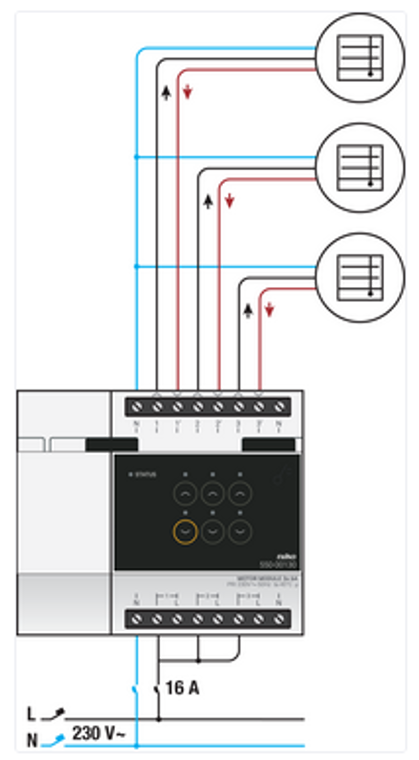
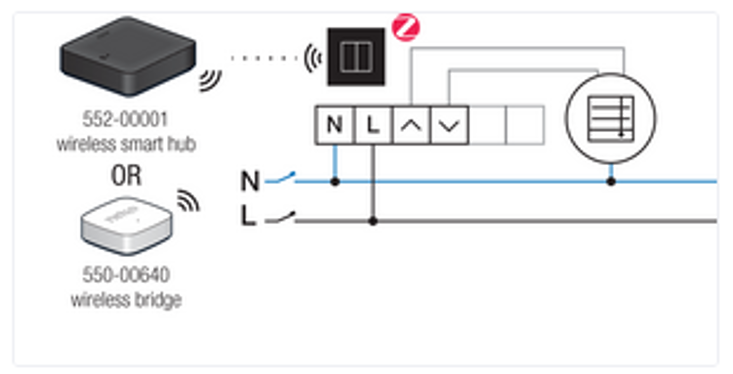
Connecting 230V AC motors
|
Via the motor module on the bus |
Via the connected motor control |
|---|---|
|
|
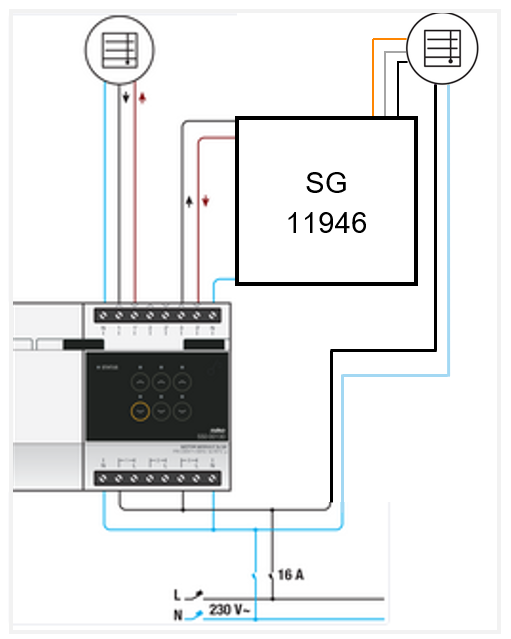
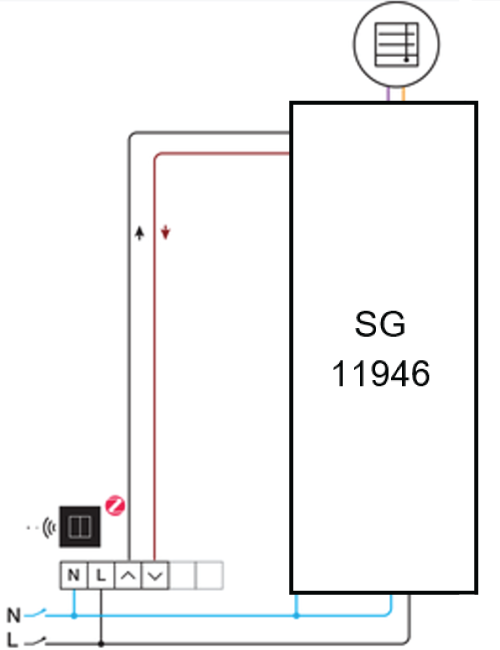
Connecting 230V AC motors over dry contact
|
Via the motor module on the bus |
Via the connected motor control |
|---|---|
|
|
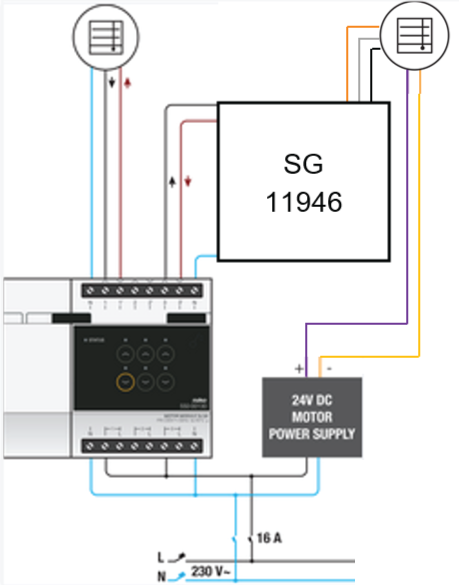
Connecting 24 V DC motors over dry contact
|
Via the motor module on the bus |
Via the connected motor control |
|---|---|
|
|
Programming the Silent Gliss connection
Configure the motor module or connected moter control via the Niko Home Control programming software. For more information, go here.
You can use the following example as inspiration or as a starting point.