Skip table of contents

Right-click in the tree view or in the drawing area

You can use right-click in the tree view or in the drawing area to configure your installation.
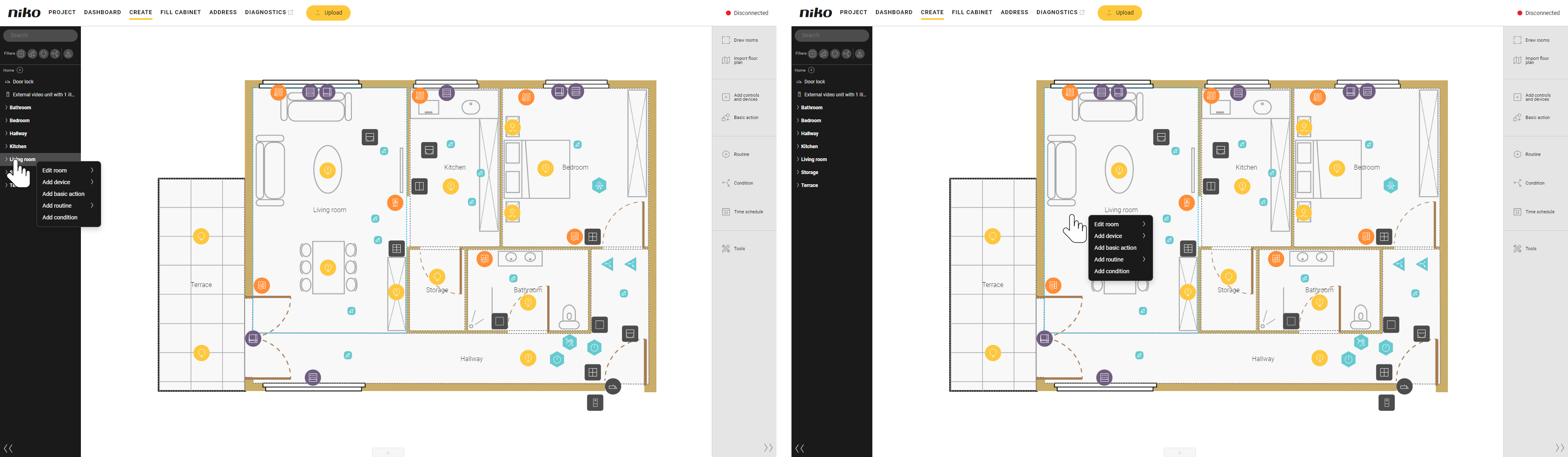
s01_11_02_224_001

Actions

From the tree view

From the drawing area

Draw a room.

  1. Right-click outside the tree structure.

  2. Select Add room.

  1. Right-click an unused spot outside a room.

  2. Select Add room.

Rename, copy or remove a room.

  1. Right-click a room name.

  2. Select the desired action from Edit room.

  1. Right-click in a room.

  2. Select the desired action from Edit room.

Create a control or device, a basic action, a routine or a condition.

  1. Right-click a room name.

  2. Select the desired item from the list.

  1. Right-click in a room.

  2. Select the desired item from the list.

You can also select a recently used control or device, or routine.

Rename, edit or remove a control or device, a basic action, a routine or a condition.

  1. Right-click the desired item you want to modify.

  2. Select the desired action.

Assign a device to a module.

  1. Right-click the device you want to assign.

  2. Select Assign to module.

  3. Select the desired module.

JavaScript errors detected

Please note, these errors can depend on your browser setup.

If this problem persists, please contact our support.