
Signal range
The operation of devices with a remote control, such as a TV or video and audio devices, is not disrupted by a Zigbee® connected socket outlet. The indoor range is ± 10 m. In open spaces, the range reaches 30 m. The range of the Zigbee® connected socket outlet depends on the materials used in the residence.
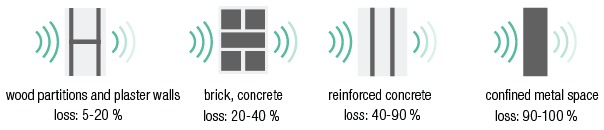
-
Also respect a minimum distance of 2 m between a Zigbee® device (including the smart hub) and another RF transmitter (for example a Wi-Fi device) or devices such as motors, pumps, electronic LED transformers, solar panel inverters, home battery storage ...
-
More information see Zigbee® network principle.
Wiring
Switch off the mains.
|
Manual use |
Connected use |
|---|---|
|
|
|


Installation
Switch off the mains.
|
Pin earthing |
Side earthing |
Action |
|---|---|---|
|
|
|
Insert only 1 electrical wire per terminal (i.e. max 2 wires per pole contact). Apply a wire stripping length of 10 - 12 mm. |
|
|
|
Mount the connected socket outlet in a vertical wall respecting to the up-marking |
|
|
|
|
|
|
|
|
|
|
|
|


-
Claws can be removed with a screwdriver without removing the screws.
-
The connected socket outlet only switches the L-wire towards its pole contact. The N-wire will not be switched.
-
Use the paint protection cap 170-00099 if you are painting the wall where the connected socket outlet is installed.