
Opis
RF rozhranie Easywave umožňuje v inštalácii Niko Home Control použiť bezdrôtové ovládače Niko Easywave. Tento modul prijíma rádiové signály Easywave, čo umožňuje použiť riadiace funkcie:
-
tam, kde by to normálne nebolo možné, napríklad na sklenených alebo betónových povrchoch.
-
pri renovácii budov chránených ako pamiatky.
-
na rozšírenie existujúcich inštalácií, kde nie je povolené vŕtanie ani drážkovanie.
-
v kancelárskych priestoroch s pohyblivými priečkami.
-
ak je potrebné vyhnúť sa komplexnej kabeláži.
Ak používate bezdrôtové komponenty v elektroinštalácii Niko Home Control pre zbernicovú kabeláž, na jednu elektroinštaláciu môžete použiť presne jedno rozhranie Easywave. Vyberte si USB RF rozhranie (410-00099) alebo Niko Home Control RF rozhranie Easywave (550-00610).
Prehľad

Prevádzka
Tento modulový prijímač umožňuje spojenie medzi bezdrôtovými ovládačmi Easywave od Niko a inštaláciou Niko Home Control. Diaľkové, resp. bezdrôtové ovládanie pracuje na báze prenosu signálu prostredníctvom rádiových vĺn na bezlicenčnom frekvenčnom pásme ISM 868,3 MHz tak, ako to uvádzajú európske normy. Túto frekvenciu smú používať iba také výrobky, ktoré nestále nevysielajú, čiže max. 1 % za hodinu (36 sekúnd). Vďaka tomu je pravdepodobnosť interferencie minimálna.
Systém zahŕňa modulárne nastavenie vrátane vysielačov a jedného prijímača. Nástenné vysielače majú podobu vypínačov a montujú sa na stenu. Diaľkové RF ovládače majú podobu tradičných diaľkových ovládačov. Tieto výrobky sú predovšetkým v súlade s európskou smernicou 1999/5/EG týkajúcou sa rádiových zariadení a koncových telekomunikačných zariadení. Táto smernica sa taktiež nazýva R&TTE smernica.
Použite iba jednotlačidlové ovládanie. Pre každú akciu naprogramujte iné tlačidlo.
Dosah signálu
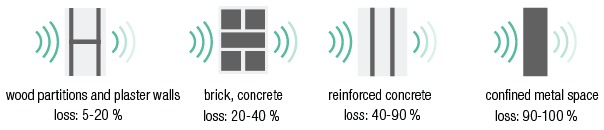
Ručné diaľkové ovládanie Easywave nemá vplyv na zariadenia, ako sú televízory alebo audio a video zariadenia, ktoré sú ovládané pomocou ručného diaľkového ovládania. Ručné diaľkové ovládanie nemusí byť nasmerované na bezdrôtový Easywave prijímač. Dosah v interiéri je ± 30 m. Na voľných priestranstvách je dosah 100 metrov. Dosah ručného diaľkového ovládania závisí od stavebných materiálov použitých v domácnosti.
Na určenie intenzity bezdrôtového signálu v danej oblasti je možné použiť diagnostický prístroj (05-370). Zariadenie dokáže rozpoznať všetky 868,3 MHz signály. Deväť LED na zariadení indikuje kvalitu prijímaných signálov alebo intenzitu všetkých rušivých signálov. To vám umožní určiť, či dosah signálu ručného diaľkového ovládania spĺňa vaše požiadavky.
Kompatibilita
Nasledovné bezdrôtové spínače/ovládače Easywave sú kompatibilné pre použitie s RF rozhraním Easywave:
-
spínač s dvoma ovládacími tlačidlami (410-00001)
-
spínač so štyrmi ovládacími tlačidlami (410-00002)
-
spínač s ôsmimi ovládacími tlačidlami (410-00003)
-
mini RF ručný vysielač s jedným kanálom, jedno ovládacie tlačidlo (05-311)
-
diaľkové ovládanie s piatimi kanálmi, tri ovládacie tlačidlá (05-313)
-
mini RF ručnývysielač s jedným kanálom, štyri ovládacie tlačidlá (05-314)
-
mini vysielač (rozhranie) s batériou (05-315)
-
okenný kontakt (05-363)
Inštalácia
Schéma zapojenia

Pri inštalácii modulu postupujte podľa nasledujúcich pokynov:
-
Uistite sa, že počas inštalácie bude zariadenie odpojené od elektrickej siete.
-
Na dosiahnutie maximálneho dosahu signálu umiestnite anténu mimo rozvádzača na kovový povrch s minimálnymi rozmermi 15 x 15 cm.
1. Zatlačte modul na DIN lištu, až kým nezacvakne na miesto.
2. Pripojte externú anténu (je súčasťou dodávky) k modulu. Externá anténa má prepojovací kábel s dĺžkou 2 m.
3. Pripojte RF rozhranie Easywave k modulu, ktorý sa nachádza pred ním. Posuňte posuvný kontakt tohto modulu smerom doprava, kým nezacvakne do RF rozhrania Easywave. Tým sa zabezpečí prepojenie medzi napájacím zdrojom a zbernicou.
Chybové hlásenia
Ak modul funguje správne, stavová LED sa rozsvieti iba v testovacom režime. Nižšie uvedená tabuľka uvádza prehľad všetkých chybových hlásení.
|
LED |
AKCIA |
CHYBA |
MOŽNÉ RIEŠENIA |
|---|---|---|---|
|
STAVOVÉ LED |
Bliká – jeden impulz za dve sekundy |
Softvérová chyba |
Nesprávna verzia softvéru* *Stiahnite najnovšiu verziu softvéru z web stránky Niko, aby ste aktualizovali modul |
Technické údaje
Prostredníctvom tohto odkazu sa dostanete na stránku s výrobkami. Nájdete tam detailné špecifikácie, CE certifikáty atď.
Tento online návod sa vzťahuje na nasledujúce produkty: