
What can you do with FAAC and Niko Home Control?
Control your garage doors and gates
If you connect your motor-controlled garage doors and gates to Niko Home Control, you can control them via push buttons, the Niko Home app on a tablet or smartphone, the Touchscreen and/or Digital black.
You can perform the following actions:
-
Open/close
-
Stop opening/closing at an intermediate position
We recommend the following options to make even better use of this connection:
-
Receive an informative notification when the garage door or gate is open while you are away; see Creating notifications.
-
Automatically switch on lighting, when you open the garage door; see custom routine.
What do you need?
Niko requirements
Ihre Niko Home Control-Installation erfüllt die folgenden Anforderungen:
-
Sie hat einen drahtlosen intelligenten Hub oder einen connected Controller II.
-
Es wurde mit der neuesten Programmiersoftware konfiguriert.
Je nach den Basismodulen Ihrer Niko Home Control-Installation müssen Sie die folgenden zusätzlichen Produkte installieren:
|
|
Erforderliche Zusatzprodukte |
Referenznummern |
|---|---|---|
|
Connected Controller |
Schaltmodul mit einem freien Ausgang (E) pro Signal, das Sie in Niko Home Control verwenden möchten Wenn der Eingangskontakt Ihres Fremdgerätes nicht potentialfrei ist, benötigen Sie ein zusätzliches potentialfreies Kontaktmodul (z. B. Finder 22.32.0.230.1xx0 für 230 V Anschlüsse, Finder 22.32.0.012.1xx0 für 12 V DC Anschlüsse, Finder 22.32.0.024.1xx0 für 24 V DC Anschlüsse) |
|
|
Connected Controller mit drahtloser Bridge |
Vernetzter (Doppel-) Schalter mit einem freien Ausgang (L) pro Signal, das Sie in Niko Home Control verwenden möchten Wenn der Eingangskontakt an Ihrem Fremdgerät nicht 230 V ist, benötigen Sie ein zusätzliches 230 V-Kontaktmodul (z. B. Finder 22.32.0.230.1xx0) Der vernetzte (Doppel-)Schalter kann mit einem modularen Halter (z. B. Legrand 412950) auf einer DIN-Schiene montiert werden. |
|
|
Drahtloser intelligenter Hub |
Vernetzter (Doppel-) Schalter mit einem freien Ausgang (L) pro Signal, das Sie in Niko Home Control verwenden möchten Wenn der Eingangskontakt an Ihrem Fremdgerät nicht 230 V ist, benötigen Sie ein zusätzliches 230 V-Kontaktmodul (z. B. Finder 22.32.0.230.1xx0) Der vernetzte (Doppel-)Schalter kann mit einem modularen Halter (z. B. Legrand 412950) auf einer DIN-Schiene montiert werden. |
FAAC requirements
Your system meets the following requirements:
-
It has a potential-free or 12/24 V DC or 230 V AC contact to control the motor.
-
It is compatible with the Niko module (see Niko requirements).
Your system is one of the following FAAC products*:
|
|
Potential-free contacts |
|---|---|
|
Garage doors |
|
|
Gates |
|
*Consult the website of the supplier for detailed specifications and the latest products.
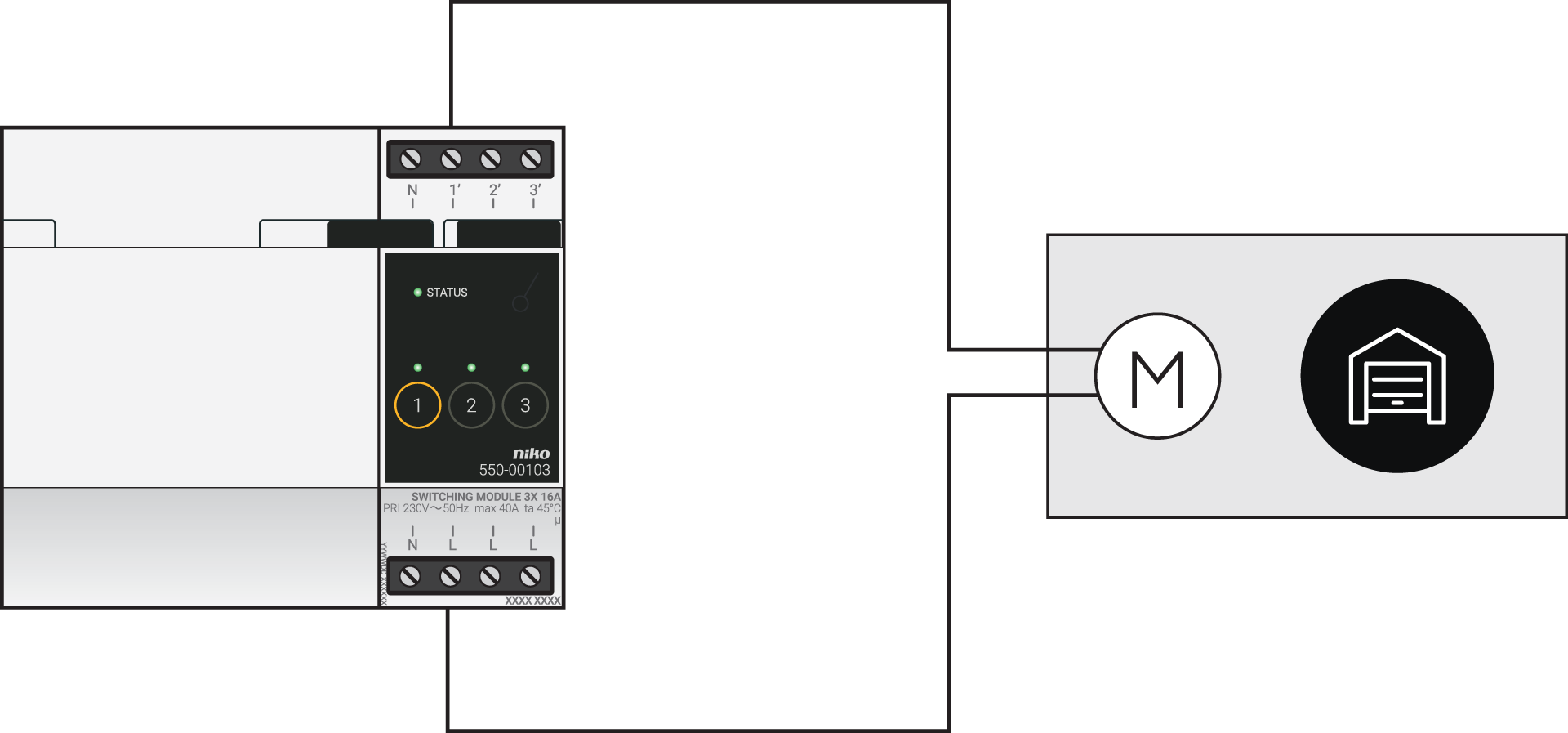
Wiring diagrams
Anschluss von Motoren mit einem potentialfreien Kontakt
|
Über das Schaltmodul |
Über den vernetzten Schalter |
|---|---|
|
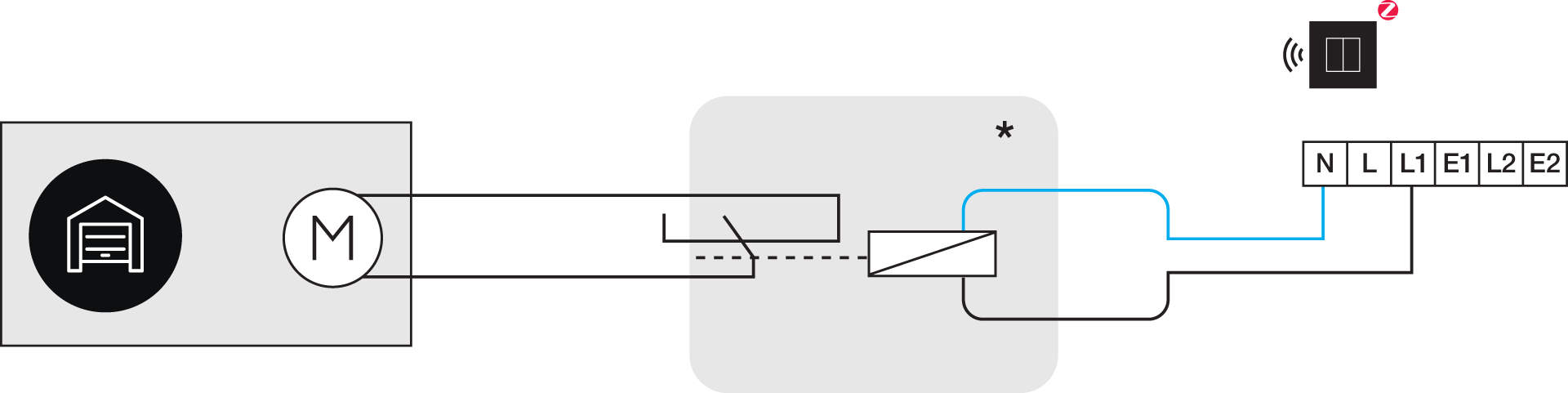
*230 V an potentialfreiem Kontaktmodul (z. B. Finder 22.32.0.230.1xx0)
|
Use the following contacts on the FAAC products:
|
|
Common |
Contact 1 |
Contact 2 |
|---|---|---|---|
|
FAAC garage doors |
J1: (-) |
J1: (OPEN-A) |
|
|
FAAC gates |
Pin 14 |
Pin 9 (open complete) |
Pin 10 (open 1 or 2) |
Programming
Konfigurieren Sie das Schaltmodul oder den vernetzten Schalter in der Programmiersoftware. Je nach Art der Installation können Sie die folgenden Anleitungen und Programmierbeispiele als Anregung verwenden:
-
Bei Bus-Verkabelung erstellen Sie eine Routine „Zugangskontrolle für motorisierte Türen“, siehe https://guide.niko.eu/en/smnhc2/lv/access-control-for-motorized-doors
-
Bei herkömmlicher Verkabelung erstellen Sie einen Impuls mit einer benutzerdefinierten Routine (Start und Stopp definieren), siehe https://guide.niko.eu/en/penhc2/lv/creating-a-pulse-of-less-than-1-second-using-a-pus