
BMS Connection
Many commercial buildings are required by the European Energy Performance of Buildings Directive (EPBD) to use a Building Management System (BMS) that monitors and controls building services, including the lighting installation. The BMS must be able to access lighting data, such as energy consumption and fault status, and support centralised lighting control. This also includes presence and light detection.
Through the 550-00372 | MOTIV DALI bridge you can connect a detector to a Building Management System (BMS).
For more information on the advantages and why this is important, go to Why do you need the DALI bridge? and Niko Lighting system
The diagram below shows an overview of the Niko lighting system with its luminaries and detectors as they are connected to a BMS via the DALI bridge:
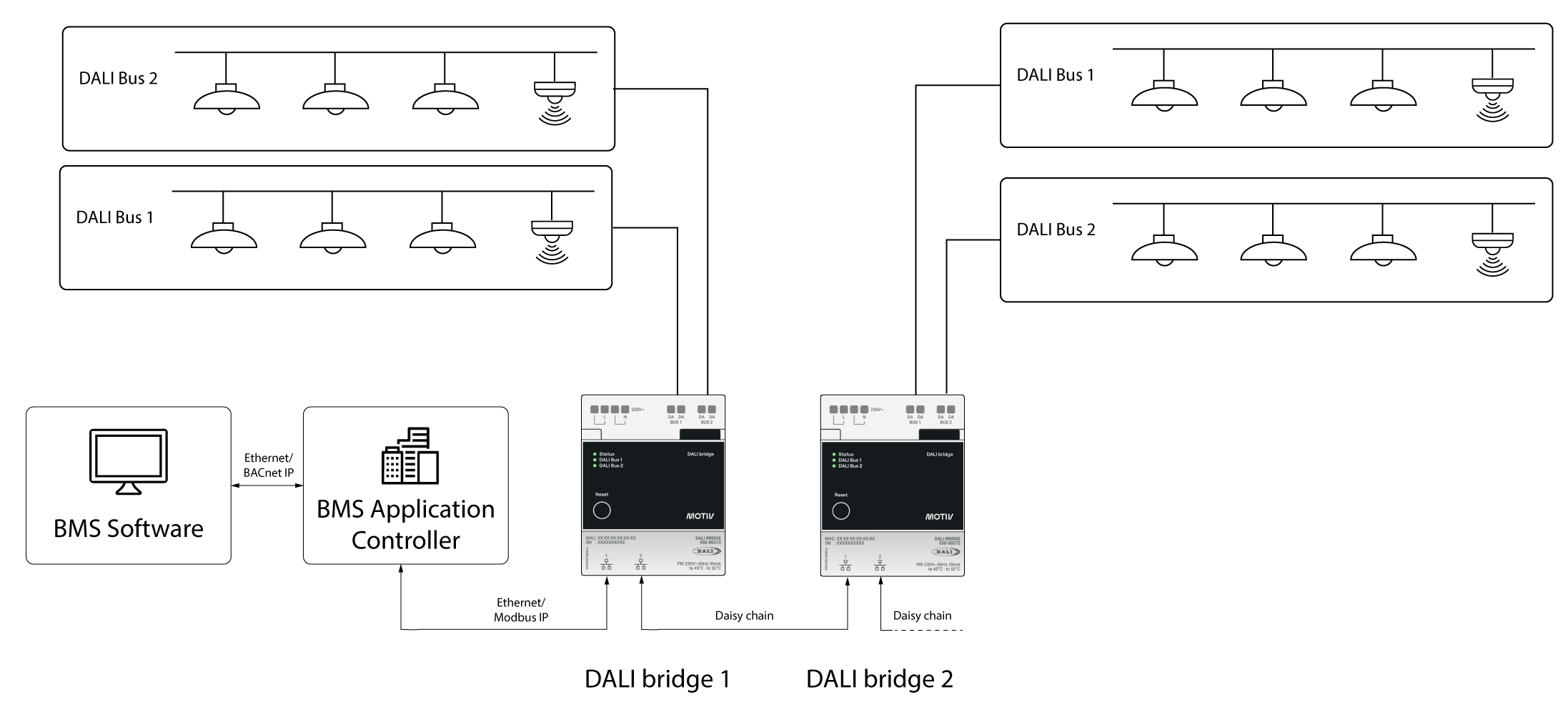
For more information on this, go to the DALI Bridge online manual.
How to set up the connection to a BMS
Proceed as follows:
-
Connect the detector to the DALI bus
-
Install the DALI bridge and connect it to the DALI bus
-
Configure the DALI bridge. Refer to Configuring the DALI bridge for more information.
-
Use the BMS software to manage the detectors and the information they provide