
What can you do with Niko Home Control?
By using Niko Home Control with your Reynaers system, you can do the following:
-
Open and close sliding windows
-
Stop opening or closing sliding windows
-
Check the status of the sliding windows (open/closed and moving/stopped)

The Reyaers functions automatically appear in your Niko Home Control apps and your touchscreens after you activate the link between both systems. These functions can also be combined in routines/actions to control multiple items simultaneously at the simple press of a button (e.g. turn off all the lights and close the window when pressing the leaving the house button).
The available functionality within Niko Home Control depends upon the specific installation features of the Reynaers system.
What do you need?
|
|
In short |
Extra information |
|---|---|---|
|
General |
Specific electrical wiring is required. |
An SVV cable with a minimum of 5 conductors is installed between the electrical cabinet and each Reynaers interconnecting module. |

|
Your Niko Home Control installation meets the following requirements:
|
For each window you need: |

|
Your Reynaers system meets following requirements:
|
|
How do you activate the link between your Niko Home Control and your Reynaers system?
You need to set up the connection and functionality via the Niko Home Control programming software. Ask your professional installer for help.
Attention: Ensure that Niko Home Control is the only system that operates (open/close) the window.
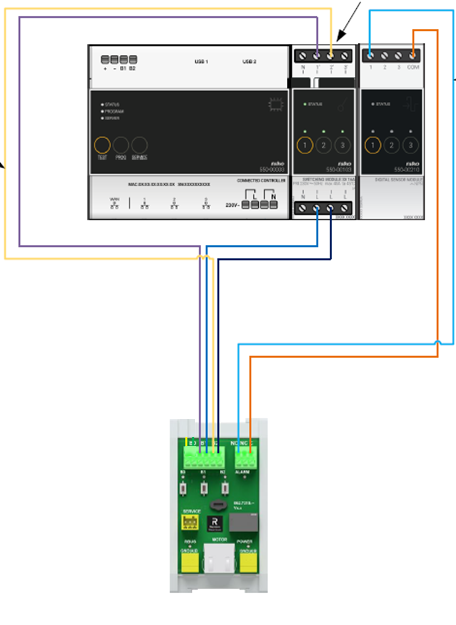
Window with a single motor
Connect as follows:
-
Connect switching module output 1 with B1 contact on module 062.7315
-
Connect switching module output 2 with B2 contact on module 062.7315
-
Connect Digital input 1 and com with NC and C on module 062.7315
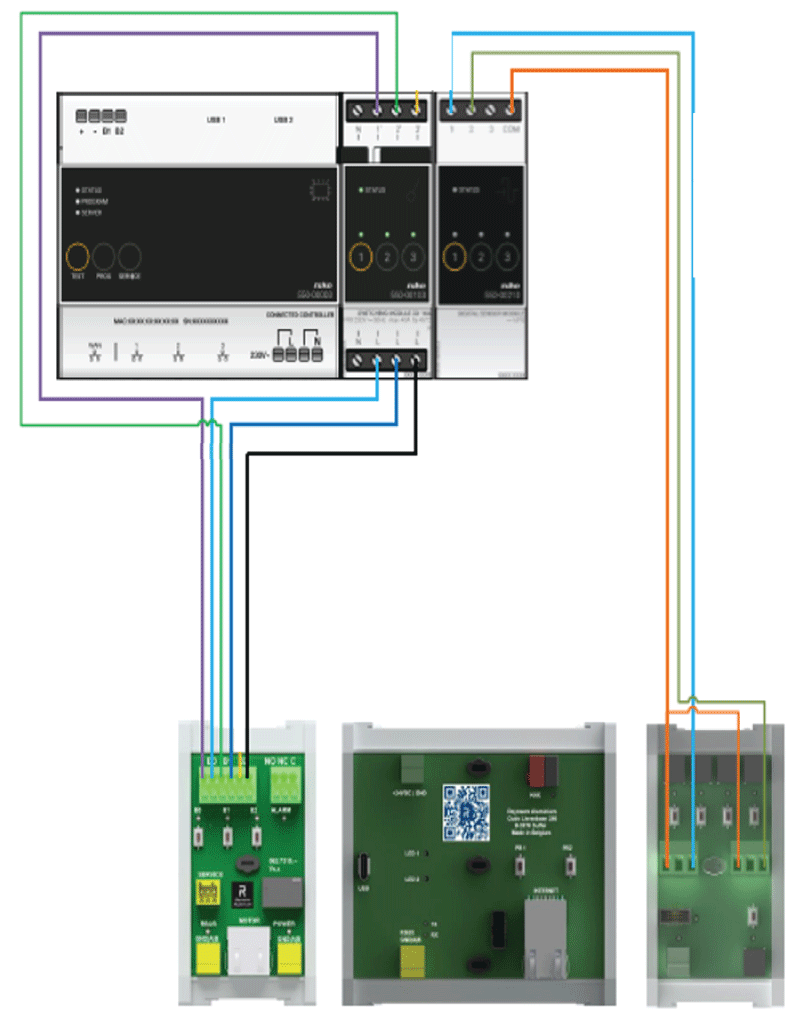
Window with multiple motors
Connect as follows:
-
Connect switching module output 1 with B1 contact on module 062.7315
-
Connect switching module output 2 with B2 contact on module 062.7315
-
Connect Digital input 1 and NO – ALARM contact on module 062.8712
-
Connect Digital input 2 and NO - MOVING contact on module 062.8712
-
·Connect COM to: C from ALARM and C from MOVING contact on module 062.8712
How do you deactivate the link between your Niko Home Control and your Reynaers system?
You deactivate the link with the Niko Home Control programming software. Ask your professional installer for help.
After deactivating the link, the following happens:
-
The Reynaers functions disappear from your Niko Home Control apps, your touchscreens and Digital blacks.
-
When used in Niko Home Control actions, the Reynaers functions will not be executed anymore.
How do you update the Niko Home Control basic actions and routines that use your Reynaers system?
You update the basic actions and routines with the Niko Home Control programming software.