
What is Secure Modbus?
Secure Modbus uses TLS encryption (enabled in the default settings) to protect communication between the DALI bridge and the Building Management System (BMS). The BMS authenticates using a digital certificate before access is granted.
TLS (Transport Layer Security) creates a secure channel between the BMS and the DALI bridge, ensuring that:
-
Communication is encrypted.
-
The DALI bridge can verify the identity of the BMS using its client certificate.
-
Unauthorised devices cannot easily impersonate the BMS.
With client authentication enabled, the BMS must use a client certificate and private key. The following files are therefore required on the BMS:
-
Client private key (client.key)
-
Client certificate (client.crt)
-
CA certificate (ca.crt)
Process
The flowchart below shows the authentication process:
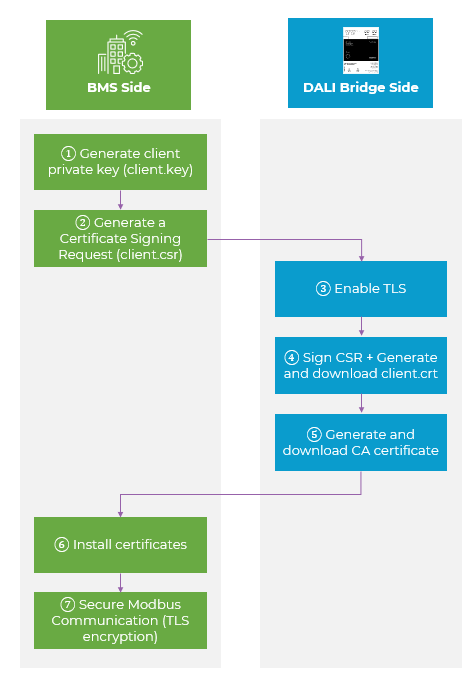
How to configure?
Proceed as follows:
Step 1 - Generate a Private Key
At BMS side, generate a client.key file. This file is secret and remains on the BMS.
Generate a private key using a tool supported by the BMS. For example, using OpenSSL, use the following command:
openssl ecparam -name prime256v1 -genkey -noout -out client.key
Store the private key securely. Do not share or transmit the private key!
Step 2 – Generate a Certificate Signing Request (CSR)
Generate a Certificate Signing Request (client.csr) using the private key.
In OpenSSL, use
openssl req -new -key client.key -out client.csr
Enter the requested certificate information when prompted. The CSR contains the private key and the identity information used for the client certificate.
Note: The certificate parameters must meet the requirements of the BMS and the DALI bridge.
Step 3 – Enable Secure Modbus
Enable the TLS option on the DALI bridge.
In the DALI bridge web interface, go to the settings tab. Change “Enable secure Modbus (TLS)” to ON
Step 4 – Upload and sign the CSR
Upload client.csr to the DALI bridge.
Under “TLS Certificate (CSR signing)”:
-
Select “Browse file...” and upload the client.csr file.
-
Select „Generate client certificate“.
-
Save the generated client certificate as client.crt.
The DALI bridge now signs the CSR and generates the client certificate (client.crt).
Note: The DALI bridge acts as the Certificate Authority (CA) and signs the CSR using its CA private key (ca.crt).
Step 5 – Generate CA Certificate
Generate the CA certificate for the BMS.
Under “Trust anchor (CA certificate)”, select “Download CA” certificate.
Save the certificate as ca.crt.
Note: The CA certificate is required by the BMS to verify the DALI bridge certificate.
Step 6 – Install Certificates
Store client.key, client.crt and ca.crt on the BMS.
Configure the BMS Modbus TCP connection for TLS and provide the files below. Configure the files according to the BMS manufacturer's instructions for Modbus TCP with TLS.
|
File |
Description |
|---|---|
|
client.key |
Client private key |
|
client.crt |
Client certificate |
|
ca.crt |
CA certificate |
Note: The BMS uses the client certificate and private key for client authentication. The CA certificate is used to verify the DALI bridge certificate.
Step 7 – Secure Communication
TLS encryption and certificate validation are performed automatically.